With a few tweaks, WordPress is amazing at SEO. Surprisingly little effort will find you achieving amazing rankings in Search Engines just by setting things up the right way from the start. Then, simply by getting into good habits each time you write a blog post, your site will continue to achieve maximum visibility in Search engines for many years to come.
Using knowledge amassed over 15 years of experience with both WordPress and search engine optimisation, I have collated the techniques which I have found most effective for setting up a WordPress blog with maximum SEO results in mind.
1. Yoast SEO
One of the most downloaded WordPress plugins of this year is Yoast SEO. This is an awesome free plugin which condenses all of the aspects that impact your search engine rankings in a convenient, inline fashion.
Below is an example of the Yoast SEO module that appears below each blog post you write, allowing you to keep track of all of the critical elements for SEO including:
- focus keyword
- keyword density
- length of article
- page title
- meta description
- …and lots more!
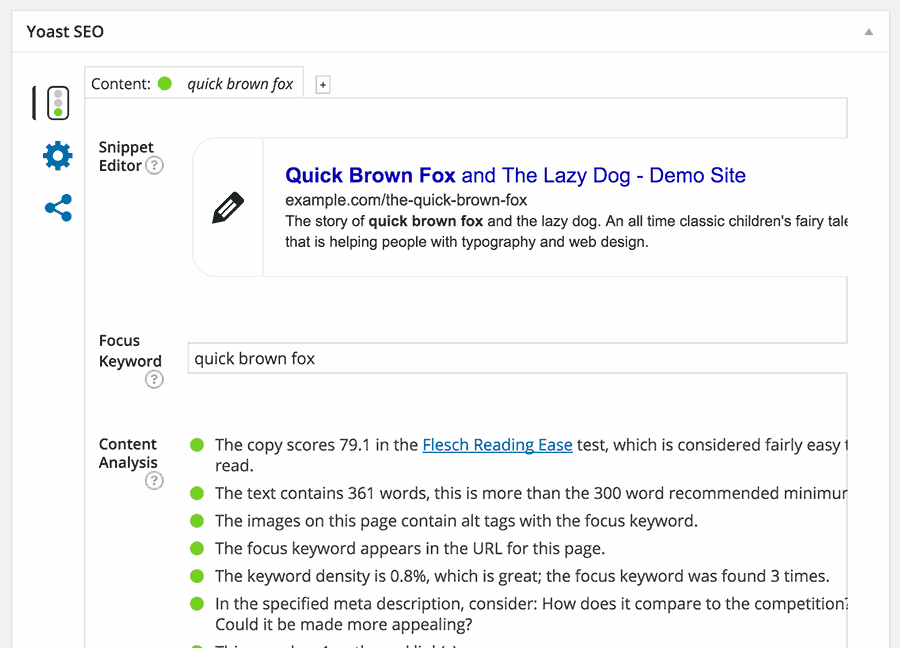
You don’t need to be an SEO guru to use Yoast. The plugin acts as a Wizard, providing expert optimisation guidance in every step of your journey. The general rule with Yoast is aim for green ‘traffic lights’ every step of the way, and you’ll be well on your way to SEO glory.
You can install Yoast SEO in just a few clicks through your WordPress administration panel. Just visit Plugins > Add New and search for Yoast. This free plugin worth its weight in gold and is the first essential weapon in your SEO arsenal.
2. Permalinks
There’s more than one way to catch a rabbit …. and there’s more than one way to setup the Permalinks on your WordPress blog! But I’ve had the most success with one particular method of Permalink setup, and because I’m a nice bloke I’m going to share it with you.
If the word Permalink sounds foreign to you, don’t worry….it’s not actually a real word! WordPress invented the concept of a ‘permalink’ in order to describe the structure of the URLs on your blog. Some people want to include dates in their URLs, others want to include categories, and some even want the author name to be included, so WordPress created a URL structure (known as the Permalink) that is completely customisable to the unique needs of the blogger.
The secret setting that I use here on The Freedom Chaser, and most of my other blogs for that matter, is pretty simple really. In the Permalink section of the WordPress Admin (Settings > Permalinks) I select the Custom Structure option and paste in /%category%/%postname%/ . This means that each URL in my blog retains a heirachy of sorts, with the category of the post appearing before the post title in the URL.
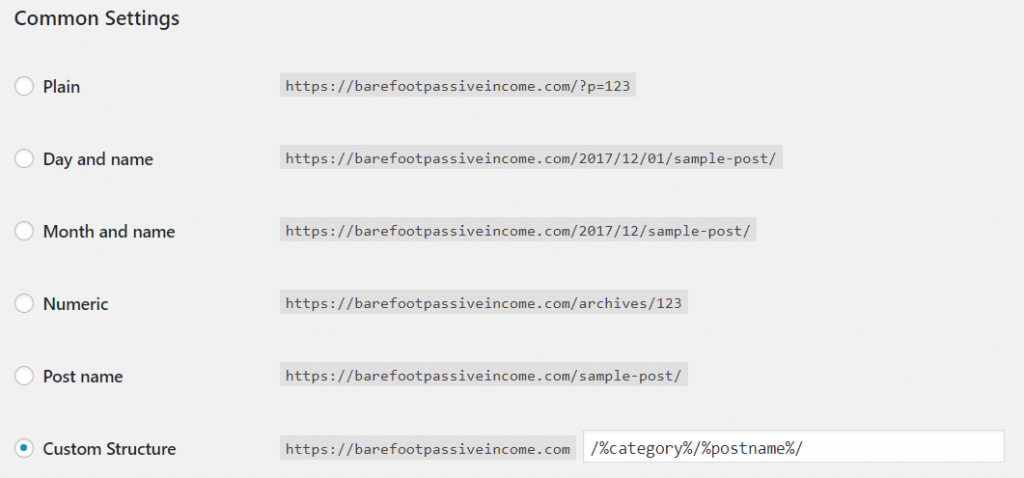
Important! As soon as you install your WordPress blog you should set up your Permalink structure. In fact, if you make changes to a blog that is already setup and has several posts published, you may end up compromising your existing Organic Search Engine rankings (not to mention that you break many of your internal links) because you are essentially changing your blog post URLs enmasse through your permalink structure.
Follow the Permalink structure mentioned above and you’ll be golden.
3. SSL (also known as HTTPS)
For several years now, the installation of a Secure Sockets Layer (SSL) certificate has been rumoured to assist with Search Rankings. In fact, there have been countless studies into the topic by leading SEO experts including Neil Patel, aiming to prove this theory. Whilst the studies have shown that sites with SSL usually rank better than those without, a game-changer came into effect in July 2018 when Google announced that it would publicly shame (my words, not theirs!) all non-SSL websites accessed through it’s Chrome browser.
For those of you without an SSL certificate, this will undoubtedly deter a significant portion of natural search traffic from visiting your blog.
Why? Because instead of seeing your beautiful homepage they will be presented with something along the lines of this….

The solution to this is to request and install an SSL certificate from your website hosting provider. (Often this incurs a fee, but if you use the A2 Hosting package that I have recommended on my Resources page and install WordPress using their one-click WordPress installation tool you’ll get SSL included free).
Most web hosts have a guide on how to do setup SSL for your website but if you are struggling to find it, contact their support team and they’ll steer you in the right direction.
So there you have it. Three settings that will give your WordPress blog the best chance of SEO success straight out of the blocks.
If you have any other WordPress tips that will maximise your visibility in organic search results I’d love to hear them – simply leave a reply in the comments section below.
Leave a Reply